


Wayfair - Shop All Things Home
4.839.85K Reviews
App Specs
- Version
- 7.32.0
- Updated On
- License
- Free
- Downloads
- 10,000,000+
- Developer
- Wayfair, LLC
- Categories
- Shopping
- Platform
- Android, iOS
Screenshots



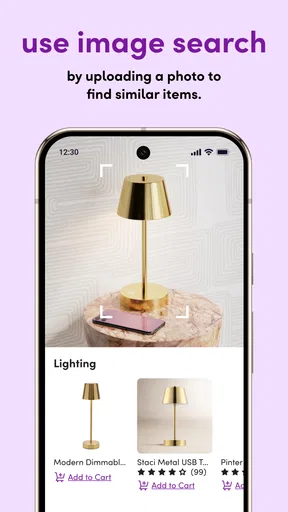
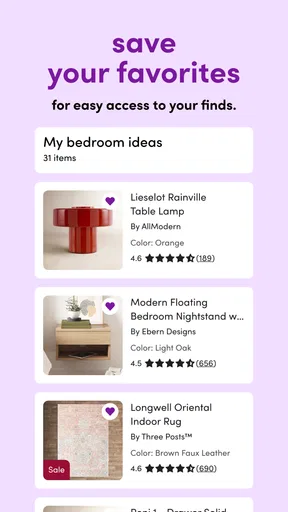



 Analysis by AppCompare
My first-week test of Wayfair - Shop All Things Home would start with a small, practical job: finding a lamp, replacing worn cushions, or comparing a few storage options before buying. The app is free, and that makes it easy to browse without committing to a purchase. I would treat it as a place to explore and narrow down choices, not as a reason to redecorate a room just because the feed keeps presenting appealing ideas.
That distinction matters because home shopping is rarely a one-session decision. A chair has to fit through a doorway, a rug has to work with the furniture already in place, and an attractive finish may look different beside your own walls. I find the app most useful when I arrive with a clear need and a few constraints, rather than opening it with only a vague wish to “make the room better.”
A useful first week, if you shop with a plan
Wayfair, LLC makes this shopping app for people furnishing or refreshing a home. Its appeal is the breadth of things to browse in one place, from furniture to smaller decorative items. In my experience, the early excitement comes from seeing options side by side and being able to move from an idea to a shortlist without jumping between several unrelated retail apps.
A sensible first pass is to search for one item, set the filters that matter, and save a few candidates rather than trying to inspect everything. For a side table, for example, I would compare the listed dimensions, material, color, and customer feedback before deciding whether it suits the room. Saving contenders also gives me a chance to revisit them after the initial excitement wears off. That pause is especially helpful for decor, where an appealing product photo can make an item feel more essential than it is.
What keeps it useful from month to month
The app has a 4.8 average from around 451,000 ratings, and it has been installed over 10 million times. Those figures suggest that many people use it, but they do not tell me whether a specific piece will suit my home. I still read product details and reviews carefully, especially for furniture that I expect to keep for years. The app is free and rated for Everyone, so browsing is accessible to a broad household audience; purchasing decisions still deserve the same care as they would on a website or in a store.
Its recurring value is strongest when a home changes in stages. I might use it one month to compare lamps, then return later when I need a shelf or a different set of dining chairs. Idea Boards can help keep those separate projects from blending together: I would make one board for each room or renovation task, then use it as a working shortlist rather than a collection of every attractive item I encounter. That small bit of organization can make later browsing faster and reduce the temptation to start over each time.
How I would judge a purchase beyond the screen
Shopping for home goods in an app is convenient, but a screen cannot answer every practical question. Before ordering a large item, I would measure the space, check the route into the room, and compare the product dimensions with the furniture I already own. For textiles and finishes, I would think about how they need to coordinate with existing colors and how much everyday wear the room gets. Reviews can flag issues other shoppers noticed, but they are one part of the decision, not a substitute for checking whether the item suits my particular space.
Worth Reading Before You Choose

EA SPORTS FC Mobile 26 Is a Bigger Football Game, but It Takes Time

Flipboard Shows What News Apps Must Do Beyond the Feed

Switching to Android Auto Means Rethinking Your Driving Routine

Google Calendar Makes a Crowded Week Easier to Manage

Ludo King Makes the Most of the Minutes Between Plans

Baby Panda World Brings Quick Play to Modern Phones, but Its Game Library Feels Busy
This is also where the app differs from visiting a local furniture shop. Browsing on a phone can expose me to many more styles without spending an afternoon travelling between stores, while a physical shop lets me inspect scale, texture, and construction in person. I would use Wayfair to discover candidates and compare options, then prefer an in-person look when a tactile detail or exact color is central to the decision. For small accents, the convenience may outweigh that limitation; for a costly centerpiece, caution is more valuable than a quick checkout.
Keeping browsing from becoming a chore
A broad catalog can turn into decision fatigue if I keep scrolling without a stopping point. My practical rule would be to decide what the item must do, set a budget before browsing, and save only a manageable shortlist. I would also separate “needed now” from “nice someday” on my boards. That makes it easier to close the app without feeling that I have to resolve every room at once, and it helps keep attractive promotions from setting the pace of a project.
Deals can be worth checking, but I would compare the item against its fit, materials, and reviews rather than treating a discount as proof of value. A lower price does not make an unsuitable sofa a good buy, and a favorite listing may not be the best choice if its dimensions or finish do not work at home. That is the trade-off with a shopping app built for browsing: discovery is easy, while the discipline to stop and evaluate still belongs to me.
Browsing Made Easy
One of the first things I noticed when I opened up Wayfair - Shop All Things Home was how user-friendly the interface is. The home screen is clean and intuitive, making it super easy to navigate through thousands of products. Whether you’re looking for a sleek new sofa or just some quirky wall art, the app makes searching a breeze. You can filter by category, price, material, and more, which is a huge time-saver.
Personalized Shopping Experience
Let’s talk about personalization. The app takes into account your browsing history and preferences to suggest items that match your style. It’s like having a personal shopper who knows exactly what you like. I found this feature particularly helpful, as it introduced me to products I might not have considered otherwise. Plus, the app’s "Idea Boards" feature allows you to save your favorite items and create mood boards for different rooms. So, if you’re planning a big home project, this tool is a game-changer.
Deals and Discounts Galore
Who doesn’t love a good deal? Wayfair - Shop All Things Home regularly offers discounts and promotions, which are prominently displayed on the app. I found myself constantly checking the "Deals" section to see what new bargains I could snag. There’s something for everyone, whether you’re on a tight budget or looking to splurge a little.
Product Details and Reviews
Before making a purchase, I always like to do a bit of research, and the app makes this easy with detailed product descriptions and customer reviews. It’s like having a community of fellow home enthusiasts right at your fingertips. Reading through reviews helped me make informed decisions and avoid potential buyer’s remorse.
Seamless Checkout and Delivery
Once you’ve found the perfect items, the checkout process is straightforward. Wayfair offers multiple payment options, making it hassle-free to complete your purchase. And let’s talk about delivery for a second. The app keeps you updated every step of the way, so you know exactly when to expect your new home goodies. Plus, their customer service is responsive and ready to assist if any issues arise.
Room for Improvement?
While Wayfair - Shop All Things Home is impressive, it’s not without its quirks. On occasion, I noticed that the app can be a bit slow to load, especially when browsing through large selections. It’s a minor inconvenience but worth mentioning. Additionally, with so many options available, it can sometimes feel overwhelming. However, the robust filtering system helps mitigate this issue to an extent.
On a more ordinary shopping day, I would use those filters to solve a specific problem rather than browse at random. If a narrow entryway needs a place to drop keys, I would look for a compact table, check its dimensions against the available wall space, and save a couple of alternatives. Then I could leave the app, measure the entryway properly, and return with a clearer sense of what fits. That two-step habit is less exciting than impulse browsing, but it is more likely to lead to a purchase I keep.
The product pages and customer reviews are useful for a second reason: they can reveal which details deserve a closer look. I would scan feedback for comments about assembly, finish, comfort, or how an item compares with its photos, then check whether several reviewers mention the same concern. A single opinion may reflect one person’s taste; a recurring practical issue is more meaningful. I would still treat reviews as guidance rather than a guarantee, particularly when choosing a large piece that is difficult to return or replace.
Who benefits most from this kind of shopping
I think the app is best for someone who enjoys comparing home styles, has a specific room or item in mind, and is comfortable making a careful decision from product information and shopper feedback. It can also suit renters and first-time homeowners who are furnishing gradually: boards make it easier to keep ideas for different rooms separate, while filters help bring a broad search down to a more workable set of options.
It is less suitable for someone who needs to touch a fabric, test a chair, or see a finish under real lighting before feeling confident. In that case, I would use the app for research and inspiration, but make the final choice through a retailer with a convenient showroom or another way to inspect the item firsthand. It is also not the right tool if I am simply looking for the fastest possible purchase of a familiar household staple; a nearby shop or a retailer focused on that one product type may make the decision simpler.
Checkout is only one part of the commitment
The original appeal of an easy checkout should not distract from the work that follows. Furniture can involve planning for delivery, clearing space, and assembling or arranging the room, so I would think through those practicalities before placing an order. If I am buying several pieces for one room, I would avoid committing to the whole set at once unless I have checked how the dimensions and finishes work together. A saved shortlist gives me room to compare and stage the project instead of treating one shopping session as a deadline.
That is where the app’s convenience has a clear limit. It can make product discovery and ordering feel straightforward, but it cannot decide whether a purchase fits my budget, whether I have room for it, or whether a temporary trend will still suit me later. I would rather let a board sit for a while and revisit it than fill a room because several items looked appealing in the same browsing session.
Does it earn a place on my phone?
Wayfair’s Android app is at version 7.20.2 and requires Android 10 or later. The company has been offering the app since February 20, 2015, and that longevity is less important to me than whether it remains useful between projects. For a person who regularly shops for furniture, decor, or household updates, it can earn a place as a practical catalog and planning aid. Someone who rarely changes their home may get more value from opening it only when a real need comes up rather than keeping it in a daily routine.
My own long-term approach would be to keep the app for focused searches, saved room ideas, and checking product feedback, while resisting the urge to treat its promotions as a reason to shop. The most useful habit is not constant browsing; it is returning with a clear question and leaving once I have a sensible shortlist. That gives the app a job beyond novelty and keeps home projects tied to actual needs.
Overall, Wayfair - Shop All Things Home is a fantastic app for anyone looking to spruce up their living space. It offers a seamless shopping experience, a wide range of products, and plenty of opportunities to save. While there’s always room for improvement, it’s a solid choice for home decor enthusiasts.
If you’re ready to transform your home, give Wayfair a whirl and see what treasures you can uncover. Happy shopping!
Pros
- Wide variety of home items available.
- User-friendly interface enhances shopping.
- Regular updates with new features.
- Personalized recommendations improve browsing.
- Detailed product descriptions and reviews.
Cons
- Occasional slow load times reported.
- Push notifications can be overwhelming.
- Limited AR features for product preview.
- Some users report app crashing issues.
- Certain items may lack detailed images.
FAQs for Wayfair - Shop All Things Home
Is the Wayfair app free to download and use?
Yes, the Wayfair app is free to download on both Android and iOS devices. Users can browse through a wide range of home goods, furniture, and decor without any cost. However, while the app itself is free, you will need to make purchases for any items you wish to buy. Additionally, shipping fees may apply based on your location and selected items.
Does Wayfair offer any discounts or special deals through the app?
The Wayfair app frequently provides exclusive deals and discounts that are not always available on the website. Users can take advantage of app-only sales, flash deals, and notifications about upcoming promotions. It's a great way to save money on home essentials and luxury items, so keeping the app updated and enabling notifications can be beneficial.
Can I track my orders using the Wayfair app?
Yes, the Wayfair app allows you to track your orders easily. Once you make a purchase, you can access your order history and check the status of your delivery directly through the app. This feature provides real-time updates, including shipping information and estimated delivery dates, ensuring you stay informed about your purchase every step of the way.
How does the Wayfair app handle returns and refunds?
The Wayfair app streamlines the process of returns and refunds. If you need to return an item, you can initiate the return process through the app by accessing your order history. The app guides you through returning items, providing shipping labels, and tracking the refund status. Be sure to check their return policy for specific guidelines and timeframes.
Are there any personalization features available in the Wayfair app?
Yes, the Wayfair app offers a variety of personalization features. Users can create wishlists, save favorite items, and set preferences to receive personalized recommendations. The app also allows you to visualize products in your space using augmented reality, helping you make informed decisions about how items will fit and look in your home.


